Why good Google Ads campaigns still lose clients
The client blames the ad manager. The ad manager blames the client. There is a better way.
Published March 2026. Last updated July 2026.
Every month Google Ads agencies spend hours preparing reports for their clients. Most of them end up archived and unread.
This seems like a bit of a waste.
Over the years, an ecosystem of tools, data connectors, and now AI has evolved to make reporting easier, faster and prettier.
But I don't think the reports have got better. In fact, I think most of them focus on the wrong things. They describe what happened inside Google Ads, but say very little about what happened after the lead arrived.
Let me explain.
Agency reports usually come in three flavours:
At the tactical level, reports focus on what work the agency did:
I think of these as the "We're working, don't fire us" reports. They're meant to prove that the agency is earning their fee.
The problem is that most business owners struggle to connect activity like adding a keyword to real business results.
Operational reporting moves up a level. Instead of focusing on tasks, it focuses on campaign performance.
Typical metrics include:
This is more useful because it tells you how the ads are working. But it still doesn't connect ad performance to business results. The client can't look at the report and know if the campaign actually made money.
Most reports stop at the operational level because that's where the data stops. The next level - strategic reporting - needs information from the client's sales process, and that's not easy to get.
Strategic reporting connects ad performance to business outcomes.
For example:
This answers the question clients actually care about: What did I get from all the money I paid Google?
Strategic reporting also highlights opportunities to improve results. When you can see what happens after the lead arrives, you can see where leads are being lost.
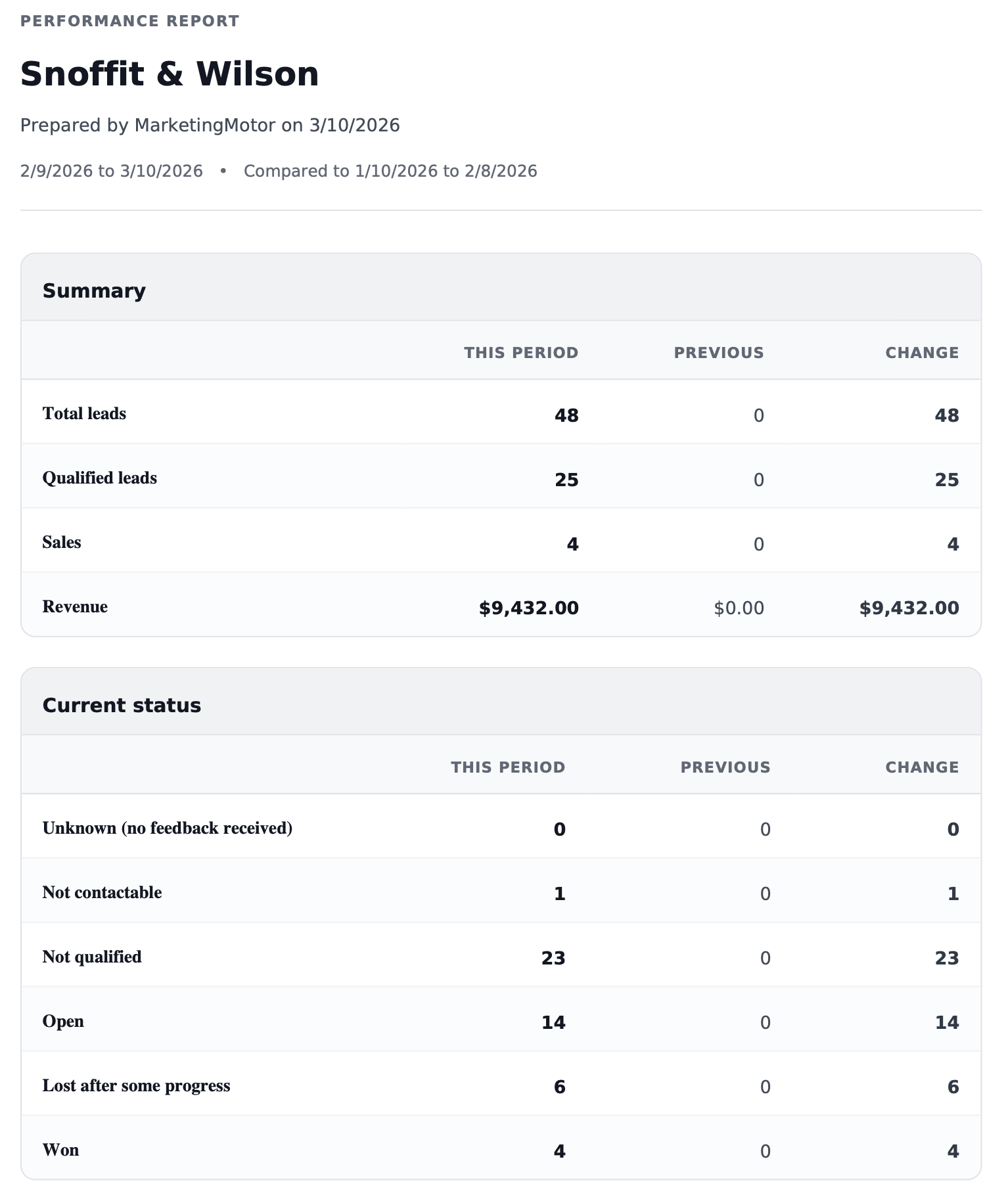
Over the last couple of months I've been working on a reporting and data system designed to connect advertising activity with what happens after the lead arrives.
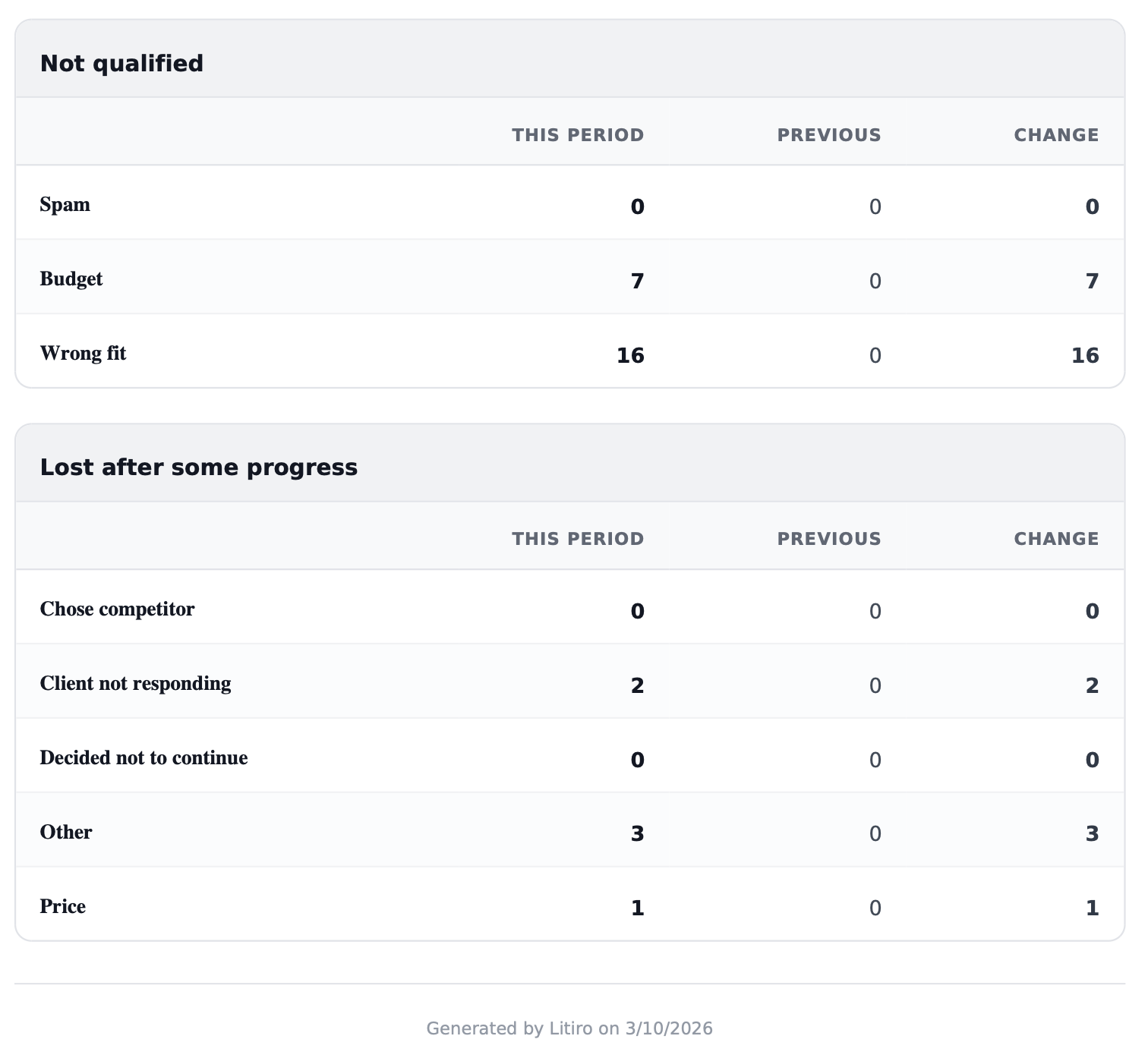
Instead of stopping at clicks, calls or form submissions, it records what happens to each lead as it moves through the sales process.
For example, a lead might be:
This makes strategic reporting much easier. Instead of focusing only on clicks and leads, the report shows things like:
I've used this report with a handful of clients. It's led to some really useful conversations.
Here's a screenshot of an example in case you're looking for ideas in designing your own strategic-level report.

The client blames the ad manager. The ad manager blames the client. There is a better way.
That makes a point-by-point rebuttal a trap. Here are some better ways to handle an AI ambush.
I advise a handful of agencies and in-house Google Ads teams. Over time, I’ve noticed a recurring problem creep in. Some people start outsourcing their critical thinking to me.
When a well-built Google Ads campaign stops working, sometimes there’s no good way to fix it. Here’s how to handle that with honesty and care.
Quick fixes in Google Ads often backfire for small business owners because surface-level metrics mislead. Here's the four-step plan to turn a Google Ads accounts around.
I delivered 50% more leads for a client—then got fired. Here’s why I won’t take responsibility for results without control of the landing pages.
Thoughts and lessons on client selection, burnout, pricing, and modernising legacy accounts, from someone who's run a Google Ads for years.
Understand what happens after someone clicks your advert. Subjects include offline conversions, CRM integration, attribution, auditability and marketing instrumentation.
Articles about marketing, engineering, AI and problem solving that don't fit neatly into the other topics. These are some of the ideas and experiences that have shaped how I think.
How to choose the right Google Ads agency, set them up to succeed, judge their work fairly, and build a relationship that delivers better business results.
Learn how to use Google Ads to generate profitable leads. Subjects include campaign strategy, bidding, targeting, optimisation and the challenges of running lead generation campaigns.
Understand why some leads become customers while others don't. Subjects include diagnosing poor leads, qualification, filtering junk leads and improving the feedback you send to Google Ads.
Things I've learned about high-converting landing pages. Subjects include copywriting, page structure, forms, trust, conversion rate optimisation and user experience.
What happens after a lead has been generated determines if Google Ads is profitable. Subjects include first contact, follow-up, quoting, lead nurturing and turning more enquiries into customers.