Are you accidentally polluting your conversion data?
How to give Google Ads cleaner feedback about lead quality.
Published April 2026. Last updated July 2026.
Fluent Forms is a great way to capture leads from a WordPress website. But if you run Google Ads there is a gap in the system.
Google can see the click and the form submission. But it can't see what happens after the lead arrives.
It can't see if the lead was a good fit, if the enquiry turned into a booking or a quote, or if the lead became a customer.
Without that information you can't optimise campaigns for real business outcomes. You're stuck at optimising for form submissions regardless of the lead quality.
In this article I'll show how I helped a new Litiro client set up offline conversion tracking for Fluent Forms so they could optimise their Google Ads for better quality leads.
Their setup was pretty standard. Fluent Forms captures the lead and sends it to the sales team by email.
This works fine for responding to enquiries. But it doesn't help when you want to track what happens to the lead afterwards. You need offline conversions for that.
To upload offline conversions you need two types of information:
To do this:
landing_page_url or something similar. Set the value to {http_referer}.Fluent Forms will then send the landing page URL and the GCLID and other tracking parameters with the name, email etc.
But you'll only get the tracking information if the visitor submits the form from your landing page. If they navigate away before filling in the form you lose the tracking information. There are ways to work around this. The exact method depends on what privacy laws apply in your country and how your site is set up. Contact me if you need help with this.
Fluent Forms Pro can send a webhook when the form is submitted. We use this feature to get the data from Fluent Forms to Litiro so we can upload offline conversions later.
The data capture flow looks like this
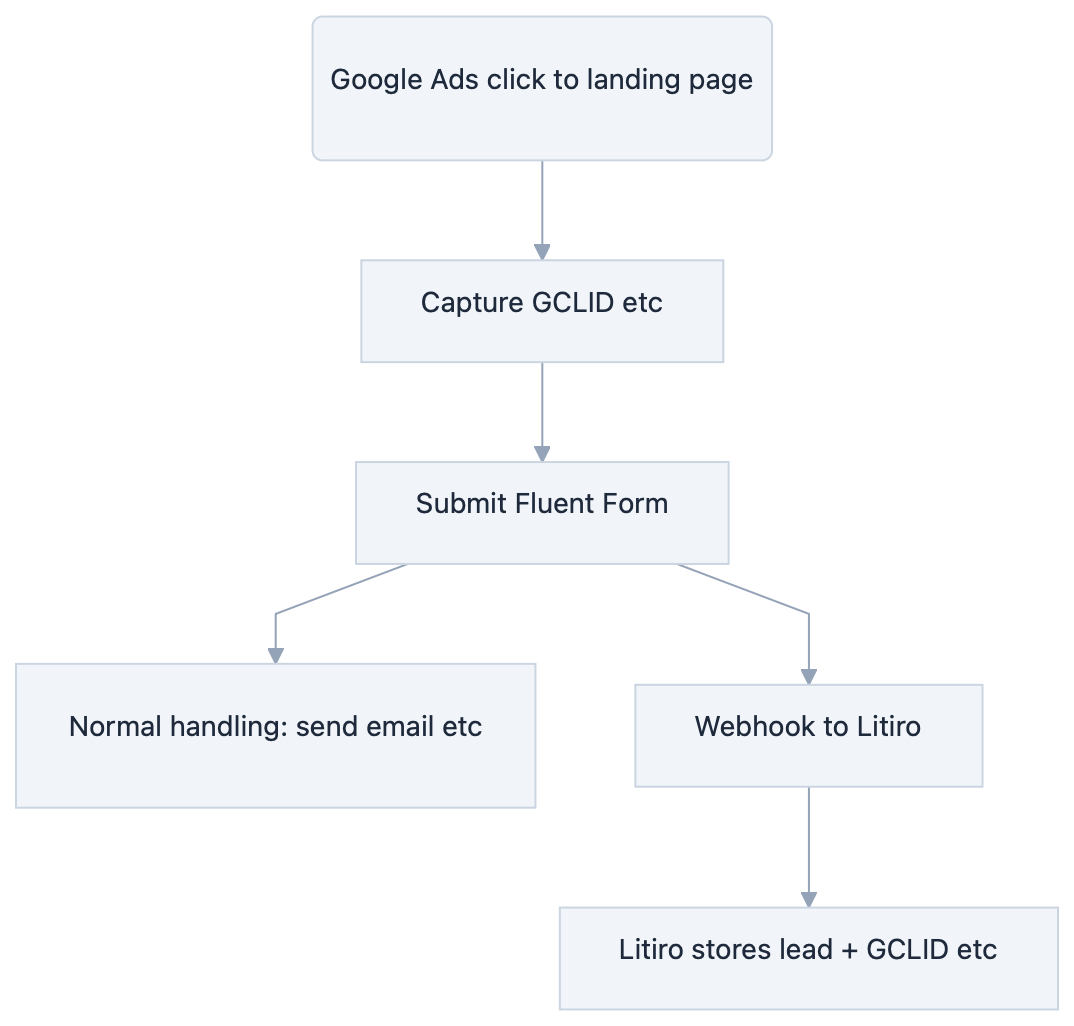
We've now got the lead and tracking information stored in Litiro. And Litiro can upload offline conversions without any fuss. No spreadsheets or CSV needed.
All that we have to do is update Litiro as the lead progresses through the sales funnel. Each update uploads a conversion in Google Ads.
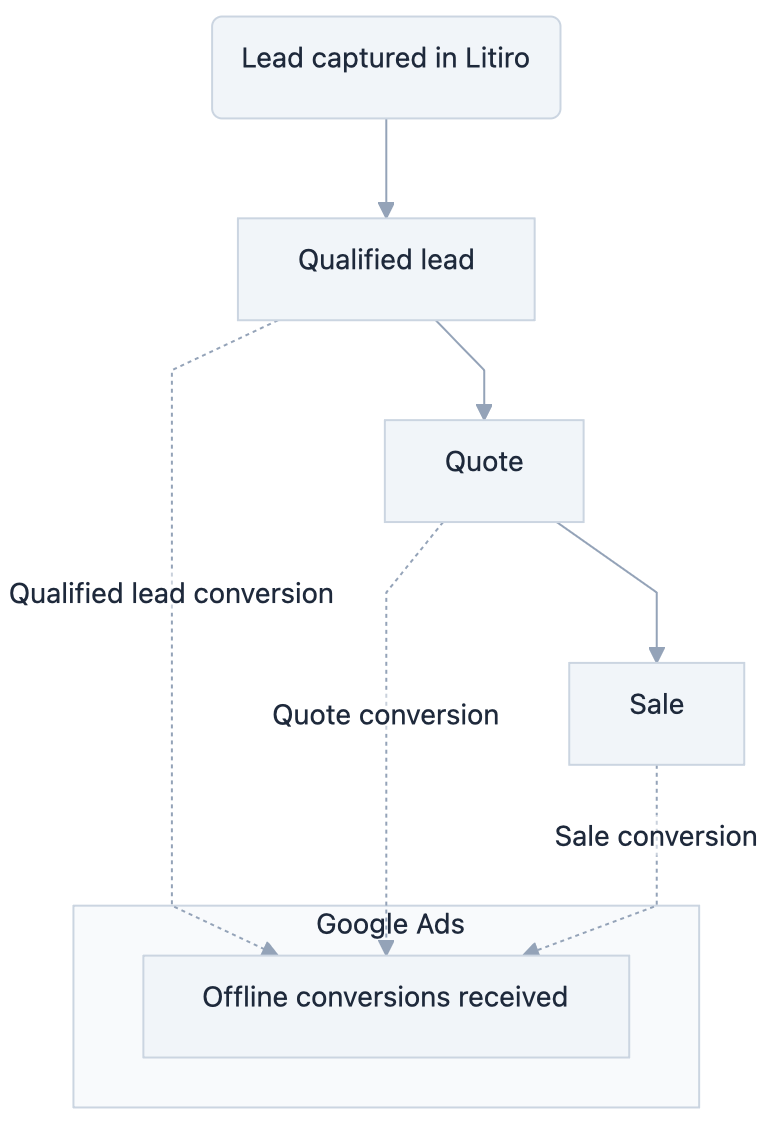
Updating the progress in Litiro is easy. There is a simple interface to do it manually, or it can be automated by connecting Litiro to other systems:
Once the setup is done it runs in the background.
This allows you to optimise your campaigns for better conversions, not just for more leads.

How to give Google Ads cleaner feedback about lead quality.
I send conversion data more slowly in exchange for data that's permanent, auditable and recoverable.
Connect Pipedrive to Google Ads and fix the offline conversion gap automatically, in about 30 minutes.
Tag-based tracking only tells Google what the browser saw. Conversion tracking must be right, reliable and auditable.
Contact Form 7 is one of the most popular form plugins for WordPress. But, if you're running Google Ads, there is a problem. Contact Form 7 can tell you that somebody submitted a form. It can't tell Google Ads if that person became a customer.
Here's the complete guide to tracking WhatsApp conversions from click to sale.
Thoughts and lessons on client selection, burnout, pricing, and modernising legacy accounts, from someone who's run a Google Ads for years.
Understand what happens after someone clicks your advert. Subjects include offline conversions, CRM integration, attribution, auditability and marketing instrumentation.
Articles about marketing, engineering, AI and problem solving that don't fit neatly into the other topics. These are some of the ideas and experiences that have shaped how I think.
How to choose the right Google Ads agency, set them up to succeed, judge their work fairly, and build a relationship that delivers better business results.
Learn how to use Google Ads to generate profitable leads. Subjects include campaign strategy, bidding, targeting, optimisation and the challenges of running lead generation campaigns.
Understand why some leads become customers while others don't. Subjects include diagnosing poor leads, qualification, filtering junk leads and improving the feedback you send to Google Ads.
Things I've learned about high-converting landing pages. Subjects include copywriting, page structure, forms, trust, conversion rate optimisation and user experience.
What happens after a lead has been generated determines if Google Ads is profitable. Subjects include first contact, follow-up, quoting, lead nurturing and turning more enquiries into customers.